Friday, December 13, 2013

How to search a file in your PC by using CMD, notepad


Hello friends, Here I'm with a new trick How to show your desired-named file in your PC by your CMD. by using notepad. The file you search will be resulted with in 10 seconds.


Just copy and paste the following code in notepad and save it as anything.bat. Remember, save the file with extension ".bat". Or justdownload the file from here.

set shell = CreateObject("WScript.Shell") fileNam=Inputbox("Enter part of the file name you want to search","File Name") If(fileNam <> "") then dirName=Inputbox("In which drive you want to search ?"+vbcrlf+"Example: If you want to search in D drive then enter only D","Drive name") msgbox "Searching the entire drive may take some seconds. Press OK continue.",,"Message" Shell.run "Cmd.exe" WScript.Sleep 3000 Shell.sendkeys "dir "+dirName+":\ /s /b | find "+Chr(34) + fileNam + Chr(34)+"{ENTER}" End If

Now just open the file. It will promt you to enter the drive letter where you want to search.
Now enter the drive letter and the string you want to search named with.

Now the files along with the path will be displayed in your command promt with in 10 seconds

Labels: , ,

Find people in fb went offline but still there on facebook

 
09:01

Hi, here I'm with a new Facebook trick that how to find people on Facebook who kept them in offline while still they are on Facebook??

Not only that. Even you can know people who are on on-line while you being at off-line by this app.

Often people on Facebook will try to keep themselves in offline when they don't want to chat with friends.

But you can find such person on Fb. When you want to convey an important message then this could be useful for you.


Steps:

1] Go to facebook.com.

2] Then go to an app called Online Now

https://apps.facebook.com/newonlinenow/


If they are at offline then you can identify them. There wont be symbol before their name.

Thanks for visiting.

12 Brilliant Command Prompt (CMD) Tricks You Probably Don’t Know about


No matter how good Windows may evolve on the GUI front, Command Prompt was how it all began. So here are some great tips you can use to make yourself comfortable while working with the Command Prompt. like
1. Open Command Prompt in any Folder
2. Enable QuickEdit for Easy Copy/Paste
3.Make Undeletable, Unrenamable Folders
and 8 more amazing tricks using cmd.. Have some fun and knowledge..

Let’s roll, shall we?

1. Open Command Prompt in a Folder

When you open the command prompt, it opens up in either User or System folder depending upon whether you ran it as administrator or not. Now the thing is, if you want to execute a file in any particular folder, you would have to use the change directory(cd) command to navigate to the folder which can be a problem if the directory is nested way too deep.


To ease things you can open the folder in your Windows Explorer, hold Shift key when you right-click in the folder and select Run command window here to directly open the CMD prompt with the path to that folder directly.

2. Enable QuickEdit for Easy Copy/Paste

One thing I miss the most in Command Prompt is the ability to easily copy and paste text using the conventional Windows hotkeys. Normally, one would have to use the right-click context menu options to copy and paste text, but if you enable QuickEdit, you can do them using simple shortcuts.


To enable the QuickEdit mode, right-click on the Command Prompt Title Bar and select Properties. In the Properties Window under the Option Tab enable QuickEdit Mode. That’s all; you can now quickly select text by dragging your mouse pointer. Pressing the enter key on the selected text will copy the text to the clipboard, and a simple left click would be enough to paste the text.

3. Run Command Prompt as Admin

Many commands require you to run command prompt as administrator. When you search for CMD in Start Menu, other than selecting Run as administrator from the right-click menu, you can simply press Ctrl+Shift+Enter to open it with admin privileges. This trick will work for all the programs installed on your system.

4. See Command History

You can see last used commands in a session using the navigation buttons, but if you would like to see a list of all the commands, you can get it by pressing the F7 button.


Alternatively, you can use the command doskey /history to list these commands in the command prompt itself.


5. Change Command Prompt Looks


Are you bored with the conventional black-and-white looks of the command prompt and would like to paint it different? We have already covered a guide on how you can customize your command prompt which you can refer to make the changes.

6. Copy Commands Output to Clipboard Directly

Sometimes one might want to copy the output from a command to clipboard, like at times when you get an error, and you want to paste the exact error in email or while chatting with someone.

To store a command output to a clipboard add the command | clip at the end of the command. For e.g. Dir /p | clip

7. Drag and Drop Files to Change Path

If you are already in command prompt, and you want to copy the exact path to a folder or file to run the file or change the present working directory, you can simply drag and drop the file or the folder on the command prompt.

The path of the dropped file or folder will show up in quotes.

8. Run Commands Simultaneously

You can put && between two commands and execute them one after another. The command on the left will execute first followed by the command on the right of the double ampersand.

9. Get Help for Command


Well let’s say you know about a command, but you are not sure how it works. Not a problem, all you need to do is suffix the command with /? and execute it. If the command is valid, the command prompt will give you all the information related to it.

10. Watch Star Wars in ASCII


For all my nerdy friends who are diehard fans of Star Wars, you can actually watch the Star Wars Episode IV movie in the command prompt. Though it would be in ASCII, it will be fun. To start the movie, open command prompt, type in telnet towel.blinkenlights.nl. and press enter. 

11. Make Undeletable, Unrenamable Folders


Click on Start.
Click on Run. Type in "cmd" without quotes.
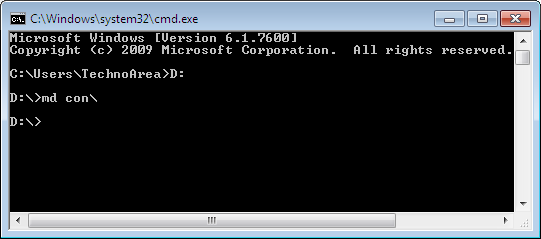
In the Command Prompt Window that opens, type the name of the drive you wish to create your folder in the format : and press Enter. e.g. If you wish to create the undeletable folder in D drive, type "D:" without the quotes. Note that the folder cannot be created in the root of C:/ drive (if C: is your system drive).
Type this command- "md con\" or "md lpt1\" without the quotes and press Enter. You can choose any of the keywords given above as the name of your folder.

Now Windows will create an undeletable, unrenamable folder in the drive you entered in Step 3. However the folder can be renamed to another keyword using Windows Explorer.

Deleting the Folder 

Although it is not possible to manually delete the folder, you can delete the folder by typing "rd con\" or "rd lpt1\" in Step 4 instead of "md con\" or "md lpt1\". 

Windows Compatibility: This works on Windows XP, Windows Vista, Windows 7 and Windows 8.

Try it yourself to create one such folder which can neither be deleted nor be renamed.

12.Know your IP address, DNS Server's address and a lot more about your Internet Connection

For Windows XP Users, there’s no need to select Run as Administrator, all you need to do is Click on Start and then Run and type cmd in the Open box and press enter.

For Windows Vista and Windows 7 Users, click on the Windows Start button and type cmd, right click cmd on the top and select Run Administrator.Command Prompt can even let you know your IP address. Just type ipconfig/ all in the command prompt and press Enter. Along with your IP address and DNS servers, command prompt will also return a ton of information like your host name, primary DNS suffix, node type, whether IP Routing ,Wins Proxy, and DHCP are enabled, your network adapter's description, your physical (MAC) address etc

Labels: , ,

how to convert videos using vlc

1) Open VLC Media Player .

2) Click on Media and select
Convert / Save (Ctrl+R ) Option.

3) Now Add the Files by using Add
Button on the new Window which
appeared.


4) Now Click on Convert / Save
Button and this will Open an
Another Window .

5) Now select the Destination File
and Profile ( Conversion Format )
as you wish.

6) Finally Click on the Start
Button to Begin the Conversion
and it is done.

Labels: , ,

"How to unlock password protected .zip files

Hello guys, Today I'm here with a new trick that
"How to unlock password protected .zip files"

Remember, this trick might not work for all time. Some files may be hash protected.
So here is trick.

Go to the following link provided below

Click here!!


And now after the page is loaded, upload your password protected zip file in the site, and click on convert file


Now the password protected file will be converted into a unlocked zip file and will be downloaded to your PC shortly.

Or if you want QR code for download link, you may even get the QR code from the same page.

Not only converting password protected zip files, there are some additional features in that site. You can convert your audio, video, document, eBook, hash, image files.

Labels: , , ,

IDEA INTERNET HACKING TRICKS

Picture
MEGA IDEA TRICK 

i have a front query of idea who works Free with idea Fresh setting. And the query name is
http://z012.fma.fb.me
So i am telling how you use this query

1-for Mobile default browser you can use this address

http://z012.fma.fb.me.php.t9space.com

and after opening page enter url and surf freely.

You can use other proxy browser insted t9space.com ex-flyproxy.com
concealme.com

2-you use this in handler opera,ucweb and nimbuzz also. For opera handler download from handler zone opera 4.2 and
open it after in primary server enter

http://z012.fma.fb.me.php.server4.operamini.com

and secondary server
socket://z012.fma.fb.me.php.server4.operamini.com
and in front query enter this

http://z012.fma.fb.me.PHP.

Now you done just save and use idea fresh setting.

Same you can use other handler software.

Note-Use idea fresh setting.
2-balance below 1 rs.

IDEA FREE GPRS 100% WORKING 

Just change your IDEA GPRS Setting.APN: mmsc OR imis
Proxy: 010.004.042.015
Port: 8080
Homepage:https://concealme.com OR https://freemenet.com OR https://flyproxy.com OR https://kproxy.com

( dont forget to put “s” after http ) working with great speed also
( its work for me on higher balance but when its not work then try at low balance )

IDEA FREE GPRS IN 3G & 2G(block)

Now you use free Gprs without any software. So For using This in your idea sim.Just use your Idea MMS setting insted of idea gprs or internet in mobile at low balance. It is absolutely Free and working great in 2G and superb speed in 3G.

So remember it is very simple just use idea Mms setting to surf the net.

I will give you mms setting if you have not. Make a new setting

Apn-mmsc
Ip-010.004.042.015
port-8080

It is also work in Pc with great speed for using in pc connect ur modeam or phone via idea Mms (mmsc) and open the firefox and go to the

Tools>Option>setting>and click on manual Proxy

and in Proxy tab fill 010.004.042.015
and in
port 8080
now save and restart Pc. Now it is Free like bird with rocket speed.

Guys my some friend was not want to i share this trick with you. But i share with you .so guys pls own use not tell everyone other it is again ban.

Note-use below 1rs.

IDEA 3G HACK INETRNET DAILY 5rs HACK

Idea 3G Internet Daily Rs5 Rental Plan Hack:18First activate idea daily rental 3G High speed Internet Plan, Activate Dial *567*910# and get daily unlimited 3G high speed fast internet browsing and downloads , Idea Daily 3G plan automatically renew next day.

Idea 3G internet accesspoint APN: imis , Must Maintain your idea mobile balance above Rs 10 for surf and downloads , night time reduce you balance below Rs 5/- , make calls and send sms ( balance detected time from 11pm to 3am), don’t recharge for that day, Repeat this 3G hacking tricks , your balance use for calls and sms not for 3G Gprs

FREE WORKING GPRS

Idea free gprs new trick just type- UNLT and send it to 54666 i think its working in all over india. 

IDEA 150Mb NET FOR 3DAYS@13rs

Idea new gprs plan hacked…, idea new 150MB Internet for 3 days @Rs13/-…. To activate it just dial*567*987# and activate it… Its activate in 4 hours. Now trick is that u can use 150 MB not only 3 day but also unlimited till ur 150 not finished…. So use tis new working gprs trick of idea…

IDEA BALANCE TRANSFER TRICK

Idea new balance transfer trick just type mobile no. Amount(you r able to trancefer10- 50 Rs.) and send it 55567 eg.: 96 ******** 10 n send it 55567 ….. Just done…

Labels: , , ,

Wednesday, December 11, 2013

How to Crack Your Windows 8 Trial Apps bkb


How to Crack Your Windows 8 Trial Apps


How to Proceed:

  1. Install wscrack_32 or wscrack_64 depending on your Windows version – x86 or x64.
  2. Install trial app store
  3. Enter wscrack_anycpu \ TokensExtractor.exe
  4. Now click on “Brute Force tokens.dat”
  5. Locate your product and click “CrackIt!” (bottom of the list is mostly …………. (Trial)
  6. App is now full license.
Run app and see if it is unlocked or not.

Please Note : Not all apps have a trial version but most do! Disable your antivirus first…. 

Download Patch/Crack/aKey For Windows 8 below:
              
 click here  link1 click here link2        PASS-- 123

Labels: , , , ,

Bitdefender 2014 Antivirus Plus Full + (2045 patch)

Bitdefender 2014 Antivirus Plus Full + (2045 patch)


Security Widget - Enables you to keep track of all of your security related tasks, drag-and-drop files for quick scanning for viruses-right from your desktop!
Parental Control - Blocks inappropriate content, restricts Web access, monitors your children's online activity.

USB Immunizer - Immunizes any Flash Drive from viruses, when they are connected to your computer.
Active Virus Control - A proactive, dynamic detection technology which monitors processes' behavior in real-time, as they are running, and tags suspicious activities. Rescue Mode - If e-threats cannot be removed, the computer is re-booted in a trusted environment which is then used for cleanup and restoration.
Vulnerability Scanner - Checks for missing or outdated security software, missing Windows security patches. Bitdefender Autopilot - provides a hassle-free experience by making optimal security-related decisions without input from you. Social Network Protection - filters/blocks social-networking e-threats by scanning the links you receive from your friends.
Search Advisor - The Link Filter relies on intelligence provided by Bitdefender Cloud services to flag malware and phishing attempts in search engine results.
Personal Data Filter - Prevents critical data from ever leaving your computer.
Antiphising - Analyzes and blocks websites that support various scams or credit card phishing attempts.
Scan Dispatcher - finds and uses time-slices when system resource usage falls below a certain threshold to perform recurring scans of your entire system.

What's new in this version: Version 2013-17.15.0.682:

Safepay does not have images in the malware alert window;
TrafficLight integration with the new Opera browser;
Security report could not be opened with Internet Explorer 11 on Windows 7;
Parental Control - Schedule blocking does not display the alert in the browser;
Parental Control - SSL certificate is not installed on a new Windows account in Opera and Firefox;
Custom scan tasks scheduled to start at system startup do not start as scheduled;
Safepay - No tab navigation available when multiple tabs are open;


Installation Guide:

1 - Install the software.
2 - Register Mybitdefender account.3 - Boot into safe mode and use the trial reset to install the auto-reset function or to use the manual reset.
3 - For autoreset: Restart/Shutdown Windows to reset the trial date. If you are using Windows 8 with UEFI bios, then you have to restart everytime you want to reset the trial date.
3 - Done,enjoy.

Use of patch 1 (good patch 2045)
1 - install your antivirus
2 - restart your pc in safe mode
3 - run patch and hit year 2045
4- restart your pc normally   Done


Download Bitdefender 2014 Antivirus Plus Full below

      click here    (64 bit)                  click here    (32 bit)

Download patch below:
              
 
                   click here  (patch1)(good)      click here  (patch 2 )  


Labels: , ,